Your Trucks Work Hard. Track Everything.
Fuel logs, maintenance schedules, inspection records, assignment history. Every vehicle in your fleet — documented, alerted, and ready when you need it.
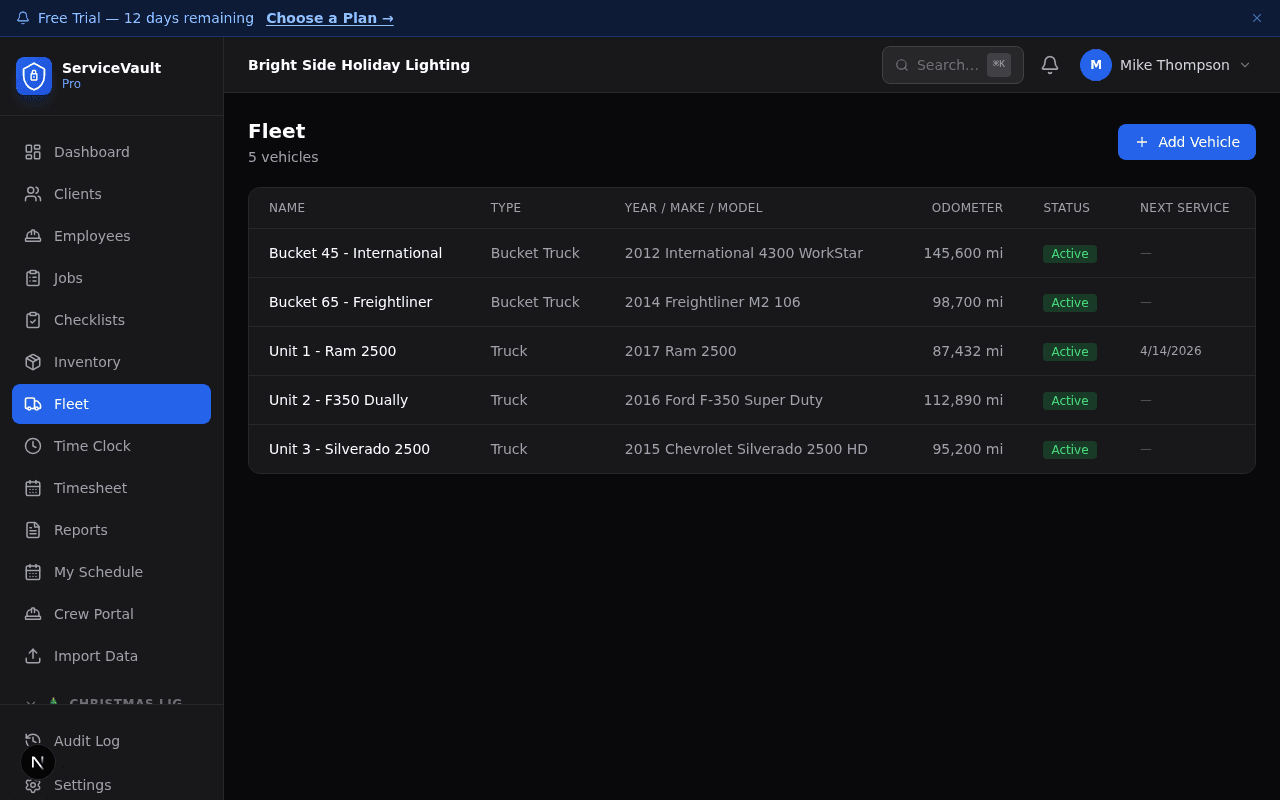
“DOT-ready records without the filing cabinet.”
Know where every truck is. Right now.
Connect your GPS provider in 60 seconds and see live vehicle positions on every map in SVP. Odometer data feeds maintenance alerts automatically — no manual entry needed.
- Works with One-Step GPS, Samsara, Motive, and Geotab
- Live map with color-coded markers: green (driving), yellow (idle), gray (off)
- Click any truck for speed, odometer, fuel level, and engine hours
- Truck positions overlay on every module map — CL, PW, and Lawncare
- Auto-refreshes every 15 seconds while you're on the page
- GPS odometer auto-triggers maintenance alerts (oil changes, tire rotations, inspections)
Your GPS watches the odometer. SVP handles the rest.
Set your oil change interval to 5,000 miles. SVP tracks every mile from your GPS in real time. When it's time — you'll know. Before the engine light comes on, before the truck breaks down on a job, and before your crew is stranded on the side of the road.
Connect GPS
Link your One-Step GPS, Samsara, Motive, or Geotab account in 60 seconds.
Set Intervals
Oil change every 5,000 miles. Tire rotation every 7,500. Fuel filter every 15,000. Set it once.
SVP Watches
GPS odometer updates every 15 seconds. SVP continuously calculates miles remaining for every service on every vehicle.
Get Alerted
Dashboard alerts, fleet page badges, and vehicle detail warnings. Yellow when it's coming. Red when it's overdue.
“A truck breakdown on your busiest install day doesn't just cost a repair bill — it costs the job, the crew's time, and your reputation with the client. SVP makes sure that never happens.”
Track intervals for oil changes, tire rotations, brake service, fuel filters, air filters, transmission service, coolant flushes, batteries, belts, alignments, inspections, and more — all driven by live GPS mileage.
Every truck. A complete record.
Year, make, model, VIN, license plate, insurance policy, and current status — all in one profile. When a truck goes into service, it's flagged out of scheduling automatically so you're never dispatching a truck that can't roll.
- Full vehicle details: VIN, license, insurance info
- Active / in-service / retired status flags
- Out-of-service blocks automatic job assignment
- Current assigned job visible from the vehicle profile
- Linked to driver/crew assignment history
- GPS Device ID links tracker to vehicle automatically
- Live odometer from GPS — no manual entry needed
Vehicles tracked
8
7 active · 1 in service
Miles logged this month
3,840
Across all active vehicles
GPS providers supported
4
One-Step GPS · Samsara · Motive · Geotab
Fuel Logging
Log fill-ups with gallons, cost, and odometer reading. Monthly fuel cost per vehicle calculated automatically — know which trucks are costing you the most.
Maintenance Alerts
Set mileage intervals for oil changes, tire rotations, or any service type. SVP watches your GPS odometer in real-time and alerts you before the threshold hits — on the dashboard, fleet list, and vehicle detail page. Red means overdue. Yellow means it's coming. Green means you're good.
Service Records
Log every service event — date, mileage, what was done, cost. Full service history for every vehicle in the fleet, searchable and exportable.
Catch it before it becomes a breakdown.
A truck breaking down on a job day isn't just an inconvenience — it's a canceled job, a crew standing around, and a client calling for an explanation.
ServiceVault Pro tracks every maintenance interval and fires alerts before the threshold hits — so you schedule the oil change on a slow Tuesday instead of dealing with it on your busiest Friday of the season.
The paper trail, without the paper.
Pre-trip and post-trip inspection checklists completed from the mobile app. Results logged against the vehicle record automatically — no transcribing from paper forms.
- Pre/post-trip inspection checklists via mobile
- Defects flagged for follow-up before next dispatch
- Full assignment history — who drove it, when, which job
- Export inspection logs for DOT compliance review
What a complete fleet record looks like.
- 1Vehicle profile with full specs and docs
- 2Fuel fill-ups with cost and odometer
- 3Maintenance schedule with alert thresholds
- 4Service history, every event logged
- 5Daily inspection results, mobile-completed
- 6Assignment history by job and driver
- 7Live GPS position and drive status
- 8Automated maintenance alerts from GPS mileage